GST Reconciliation Using AI: GSTR-2B, IMS and Practical ITC Checks
Build an AI-assisted GST reconciliation workflow for purchase registers, GSTR-2B, sales and GSTR-3B, with IMS review, a worked example and five reusable prompts.
 FREE PRACTICE PACK · SYNTHETIC DATA
Try it yourself: GST Reconciliation
Compare a purchase register with a GSTR-2B-style dataset using fictional supplier aliases.
Every workbook sheet and offline demonstration includes the AI for All logo. The dataset is supplied as Excel to retain its branding. No macros, client records or automatic posting.
1. Preserve both inputs
Open Books (6 rows) and GSTR2B (5 rows). Supplier aliases are consistent across both tables and are not valid GSTINs. The workbook covers six distinct document keys.
What to check: Match key = supplier alias + financial year + document type + invoice number.
Official workflow reference: GST Portal GSTR-2B guidance ↗
A business has hundreds of purchase invoices, several credit notes and suppliers filing at different times. A total-level comparison shows a difference, but does not explain which invoices caused it. AI can help organise this investigation—provided the underlying matching, calculations and legal review remain controlled.
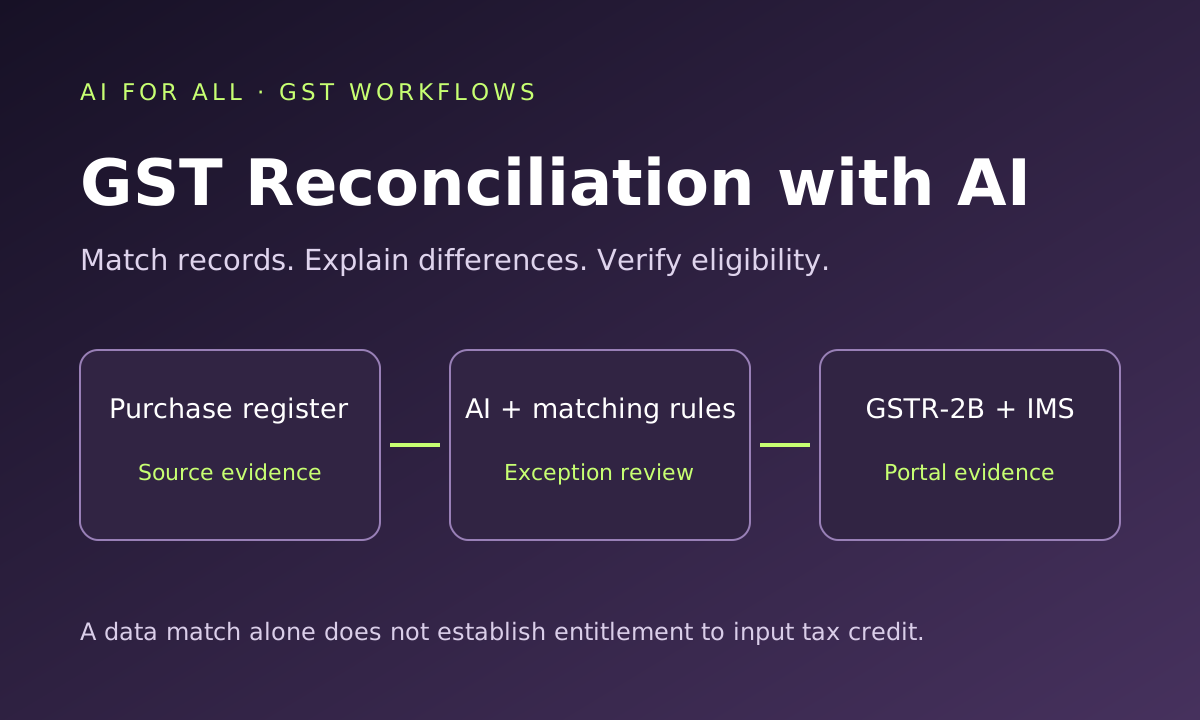
A matched invoice is a reconciled data point, not an automatic entitlement to input tax credit. AI can identify exceptions and draft explanations; the taxpayer and reviewer must establish the correct return treatment.
What does GST reconciliation involve?
| Comparison | Purpose | Typical differences |
|---|---|---|
| Purchase register vs GSTR-2B | Compare recorded inward supplies with portal-reported documents. | Missing invoices, reporting delays, tax mismatches and amendments. |
| Sales register vs GSTR-1/1A | Compare books with outward-supply disclosures and amendments. | Omissions, duplicates, classifications and period differences. |
| Outward liability vs GSTR-3B | Explain the bridge from books and disclosures to reported liability. | Adjustments, credit notes, advances and reporting errors where relevant. |
| ITC workings vs GSTR-3B and ledgers | Trace claims, reversals and reclaims to evidence and approvals. | Duplicate claims, ineligible items and carried-forward exceptions. |
GSTR-2B is an auto-drafted statement, not a return you file. GST Portal guidance asks taxpayers to reconcile it with their records, avoid duplicate credit and account for required reversals and reverse charge. Retain the downloaded statement used for the final review. Official GSTR-2B FAQs ↗
Where AI adds value
- Field mapping: suggest how Tally or other accounting-export columns correspond to portal fields.
- Data preparation: propose repeatable Excel or Power Query transformations.
- Exception triage: group differences by supplier, document type, period and issue.
- Candidate matching: identify possible invoice-number variations for review.
- Communication: draft supplier follow-ups using approved exceptions.
- Reporting: turn reconciled schedules into a concise management note and action list.
Use formulas, database queries or tested code for matching and arithmetic. Use AI for interpretation and drafting around those results. A model’s confident explanation is not proof that a match or legal conclusion is correct.
Prepare the right source files
Obtain the purchase register, relevant GSTR-2B downloads, supplier master and prior-period exception and ITC registers for the correct GST registration. Add invoices, credit/debit notes, goods/service receipt evidence and payment details where needed. Obtain IMS details relevant to the reviewed records. Keep imports, reverse-charge items and ISD credit in separately identifiable schedules rather than forcing them into ordinary domestic supplier matching.
Useful fields include recipient GSTIN, supplier GSTIN or a consistent pseudonym, financial year, document type, invoice number, invoice date, taxable value, tax rate where available, IGST, CGST, SGST, cess, booking period, portal period, source row ID and original/amended document references. Record file names and download timestamps.
A reliable eight-step workflow
1. Fix the scope and preserve the originals
State the entity, GSTIN, period, source systems and cut-off. Keep original downloads read-only and work in staging copies. Reconcile source counts and tax-head totals before cleaning.
2. Normalise carefully
Standardise dates, identifier case and numeric formats in separate columns. Preserve original invoice numbers: removing slashes or leading zeros can collapse distinct documents into the same key. Keep document signs and distinguish credit notes from invoices.
3. Apply exact matching first
Use an approved key incorporating recipient, supplier, document type and relevant financial-year context. Compare invoice number, date, taxable value and each tax head. Do not use invoice number or total GST alone as the sole key.
4. Investigate candidate near-matches
Within a suitable supplier/document group, identify differences such as punctuation or a short date gap. Show the original values and the rule applied. Require review where multiple candidates exist. A tolerance is an internal review parameter, not statutory permission to ignore an error.
5. Classify every unmatched document
Use clear categories and make ownership explicit. Avoid one-to-many joins that inflate tax totals. Where line-level books data correspond to a document-level portal record, aggregate with a documented rule and retain the underlying links.
6. Perform the eligibility review separately
Maintain an evidence-based eligibility decision alongside the matching status. A supplier explanation or portal appearance alone does not complete this review.
7. Resolve IMS and return workings
Review relevant IMS actions and prepare the appropriate return workings. Where an action changes after draft GSTR-2B generation, follow the applicable recomputation process and preserve the final version used. Do not use an earlier download after the underlying position has changed. GSTN IMS advisory ↗
8. Reconcile, approve and carry forward
Check totals by tax head, prior claims, reversals and reclaims. Obtain reviewer approval before filing. Carry unresolved documents into a controlled register with next action, owner, due date and closure evidence.
How to handle common exceptions
| Exception | Possible explanation | Required investigation |
|---|---|---|
| Books-only invoice | Supplier reporting delay, incorrect GSTIN or excluded source period. | Check the invoice and later relevant statements; seek supplier clarification. Do not claim solely on an AI match proposal. |
| Portal-only invoice | Unbooked transaction, wrong recipient or a disputed document. | Verify receipt and business ownership before posting or taking portal action. |
| Tax amount or tax-head mismatch | Rounding, rate, place-of-supply or recording error. | Review the original document and transaction facts; keep IGST/CGST/SGST differences separate. |
| Duplicate candidate | Repeated booking, repeated export rows or a similar reference. | Check source IDs and claim history; do not delete merely because amounts match. |
| Amendment | Supplier changed an earlier document. | Link original and amendment; identify the true incremental effect and avoid double counting. |
| Credit note | Return, discount or correction. | Trace the original invoice, book entry and prior ITC treatment before deciding the adjustment. |
| Period difference | Booking and portal reporting fall in different months. | Track invoice date, booking month, reflection period and claim period separately. |
Worked example: the same total can hide different problems
Illustrative ordinary domestic purchase population: assume no imports, RCM, ISD, amendments or credit notes in this simplified sample.
| Matching category | Tax in books | Tax in GSTR-2B |
|---|---|---|
| Exact matches | ₹1,50,000 | ₹1,50,000 |
| Books-only invoices | ₹18,000 | — |
| Portal-only invoices | — | ₹9,000 |
| Amount mismatch | ₹12,000 | ₹15,000 |
| Total | ₹1,80,000 | ₹1,74,000 |
The ₹6,000 net difference comprises ₹18,000 books-only tax, less ₹9,000 portal-only tax, less a ₹3,000 excess portal value on the mismatched document. None should disappear through netting. Even the ₹1,50,000 exact-match population still needs an eligibility review. Repeat the bridge separately for each tax head in actual work.
The ITC eligibility gate
Review section 16 conditions, supporting documents, receipt, supplier reporting and applicable restrictions, return compliance and relevant payment-related reversals. Screen blocked credit under section 17(5), non-business/exempt-use attribution and any other applicable limitations. Verify current provisions and transaction-specific exceptions rather than asking AI to infer them from a ledger name.
The ordinary section 16(4) limit refers to 30 November following the relevant financial year or furnishing the relevant annual return, whichever is earlier, subject to applicable special provisions. Do not treat this date as permission to defer routine reconciliation. CBIC section 16 reference ↗
Maintain an invoice-level claim/reversal/reclaim history. Determine the correct GSTR-3B reporting from the reviewed facts; do not equate the net portal total with the final claim. Import, RCM and ISD documents require their appropriate evidence and treatment.
IMS: avoid applying outdated instructions
IMS actions influence the reconciliation workflow, but do not replace legal eligibility checks. GSTN has issued subsequent changes, including facilities for specified credit notes and amendments from the October 2025 period. Check current document-specific options and conditions before selecting accept, reject or pending. Neither blanket acceptance nor blanket rejection is a sound reconciliation method. GSTN FAQ on October 2025 IMS changes ↗
Five prompts for the reconciliation team
1. Prepare the matching rules
I have an anonymised purchase register and GSTR-2B export for [GSTIN ALIAS, PERIOD]. First inspect headers, document types, signs and totals. Propose a field mapping and deterministic matching hierarchy. Retain original values and source row IDs. Do not invent missing identifiers or decide ITC eligibility. Ask about ambiguous fields before matching.
2. Classify exceptions
Using the approved matching rules, classify each document as exact match, candidate near-match, books-only, portal-only, amount/tax-head mismatch, duplicate candidate or amendment/credit-note review. Show linked source row IDs, original values, differences and the rule applied. Do not reuse one record across multiple matches or force a fuzzy match.
3. Draft supplier follow-up
Using only this approved exception list, draft a polite supplier-wise message stating invoice number, date, taxable value, tax difference and the clarification or correction requested. Use supplier aliases until recipient details are verified. Do not allege fraud, promise eligibility or send messages.
4. Prepare the ITC review bridge
Using these reconciled schedules, prior-period claim/reversal register and reviewer decisions, draft an ITC bridge by IGST, CGST, SGST and cess. Show current eligible credit, permitted reclaims, reversals and unresolved items separately. Flag overlaps and missing evidence. Reconcile to the proposed GSTR-3B figures; do not treat a matched invoice as automatically eligible.
5. Review outward supplies
Compare the sales register, filed GSTR-1/1A data and GSTR-3B workings for [PERIOD]. Separate taxable, exempt, zero-rated, credit/debit notes and other relevant categories. Preserve document keys and distinguish timing, classification and value differences. Do not net off unexplained differences or infer tax rates from descriptions alone.
The minimum exception register
Record: unique exception ID; GSTIN alias; supplier alias; document key; books and portal row references; mismatch category; tax-head differences; matching rule; evidence required; current eligibility decision; IMS/return action where relevant; responsible person; follow-up date; reviewer; and closure evidence. Retain both original and normalised values.
Protect data and verify the output
- Use a firm-approved environment; review retention, access and model-training settings.
- For general AI assistance, use consistently pseudonymised samples. Keep the real identifier mapping in a controlled environment for final validation.
- Never share portal credentials, OTPs or unrestricted client files with unverified tools.
- Check record counts, matched/unmatched completeness, tax-head totals and duplicate join effects.
- Retain model/prompt versions, matching rules and reviewer decisions. Do not automate filing or IMS actions from an unreviewed AI response.
A practical monthly routine
After the relevant source statements are available, freeze a dated working set, run repeatable matching, investigate high-value and deadline-sensitive exceptions first, seek supplier responses and complete the eligibility and return bridge. Refresh the working set if portal actions or amendments change it. Before filing, reconcile the final totals and obtain sign-off. Review carry-forward exceptions in the next cycle until resolved.
To measure productivity, track preparation time, review time, unresolved tax value, aged exceptions and corrected errors. Count all review effort; a quick match rate is not useful if it creates incorrect credit or hidden duplicates.
Official sources
Continue with Tally productivity using AI, AI for Excel and the prompt library.